For shops
Your products in the feed, not on page 5.
svibe brings items from over 70 shops into one swipe feed. Users see your products when they match their taste and tap straight through to your product page. The connection runs through your product feed at AWIN, paid per sale only.
- 70+Shops already in the feed
- 1M+Items from these shops
- CPSPaid per sale only
As of October 4, 2026, Germany.
Already on board, among others: 61 shops
Why svibe for your shop
Discovered, not searched
The feed has no search box and no results list. Your items do not queue behind big marketplaces, but appear when they match someone's taste.
No fixed fee
You pay the commission from your AWIN program when a sale happens. No listing fee, no minimum budget.
No integration effort
We work with the product feed you already maintain for AWIN. No plugin, no code, no interface.
The purchase stays with you
One tap leads to your product page. Ordering, payment, customer data and returns stay in your shop.
How your items get into the feed
1. Import
We load your product feed regularly, usually daily. Prices, sizes and availability are updated in the process; sold-out items disappear from the feed.
2. Processing
Each item is assigned to a uniform category. Size variants are merged into one card per item and color, and we filter out non-fashion such as sports equipment.
3. Delivery
The feed first shows each person the items that match their past swipes. Filtered views by category, price or size are available as well.
4. Click to you
Anyone who opens a piece and taps "Go to shop" lands on your product page through your AWIN link. The link is labeled as an ad link for users.
Requirements for your feed
The cleaner the feed, the more items make it into the svibe feed and the better the delivery fits.
Example: one item, field by field
On the left, the card as it appears in the feed. On the right, the feed fields behind it – what good looks like, and the mistakes we see most often.
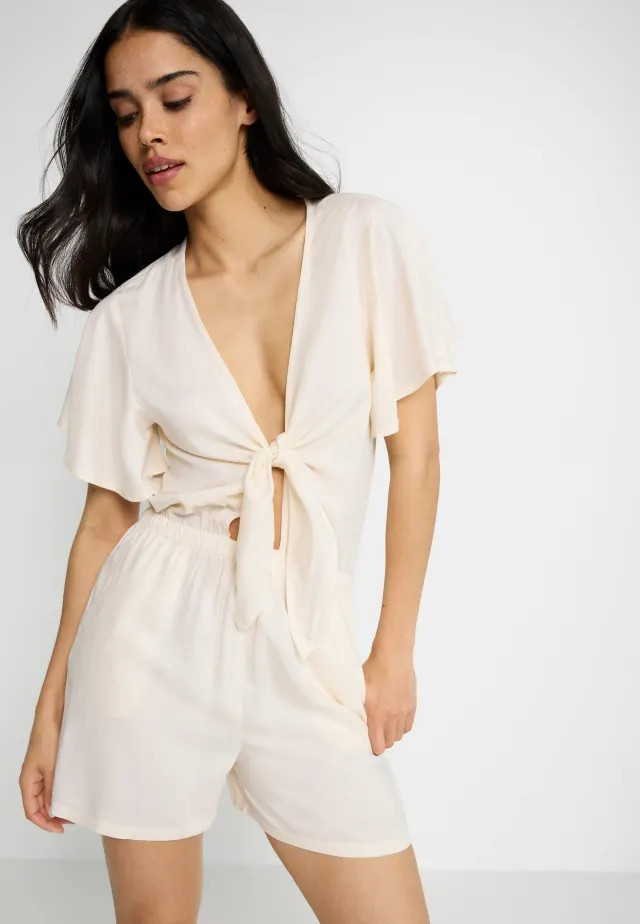
titleGood: Verner T-Shirt citCommon mistake: VERNER TEE CIT XL 7820043-XL – size and item number in the titlebrandGood: Carhartt WIPCommon mistake: Empty, or the shop name instead of the brandpriceGood: €39.95 (original price, incl. VAT)Common mistake: Net price or price without currencysale_priceGood: €24.95Common mistake: Reduced price in “price”, original missing – then we can't show a discountimage_linkGood: Portrait, 1200 px, product on a model, plus 3 more imagesCommon mistake: Watermark, “image coming soon” placeholder or a 300 px thumbnailsizesGood: S, M, L, XLCommon mistake: Missing – the item won't show up in the size filteravailabilityGood: in stock, per size, updated dailyCommon mistake: Outdated – clicks land on sold-out itemscolorGood: Black / WhiteCommon mistake: Internal colour code like “001”categoryGood: Clothing > T-shirts & topsCommon mistake: “Sale” or “New” instead of a product category – the item ends up in the wrong placedeep_linkGood: Straight to the item's product pageCommon mistake: Link to the home page or a category page
Field names vary slightly by feed format (AWIN, Google Shopping). Values for sizes, colour and availability are example values.
Images
At least about 600 px wide, portrait format ideal. Product on a plain background or on a model, no placeholder or logo images.
Required fields
Title, brand, price including VAT (plus the original price if reduced), category, color, sizes and deep link to the product page.
Availability
Stock status per item or size. Without it we assume "available" – a maintained status prevents clicks on sold-out goods.
Stable IDs
The same item number across all updates. This keeps likes and collections tied to one item.
Freshness
Updated at least daily, with prices and stock as current as possible.
Market
German-language texts, delivery to Germany and/or Austria, prices in euros.
Reporting
- Available
Clicks, sales, commission
In your AWIN account, as with any other publisher.
- In preparation
Feed quality report
How many of your items are live, how many were filtered out and why – for example missing images or non-fashion.
- In preparation
Swipe metrics by category
How your items perform in the feed, aggregated and without personal data.
Example shop
As of: one import run
Example: feed quality report
- Items delivered in feed
- 4,820
- Live in the svibe feed
- 4,310
- Filtered out: non-fashion
- 290
- Filtered out: no usable image
- 140
- Filtered out: sold out
- 80
Note in the sample: 140 items without a usable image – with larger images in the feed they would be included.
How it works
1. Email with your shop name
And, if you have one, your AWIN program ID.
2. Program join
We apply to your AWIN program. You review and approve.
3. First import
We load your feed, check images and categories, and get back to you if anything is missing.
4. Live
Your items appear in the feed. You see clicks and sales in AWIN.
Frequently asked questions
What does it cost?
No fixed or listing costs. You pay the commission from your AWIN program when a purchase is made through svibe.
Is there exclusivity?
No, in neither direction. Your items appear next to those of other shops, and you keep working with any partners you choose.
How quickly can we go live?
As soon as you have approved us in the program and the first import runs cleanly. With a well-maintained feed, that usually takes a few days.
What about data protection?
We do not pass on any personal data of our users to shops. The click to you runs through the AWIN link; AWIN handles the tracking under its own terms and within the scope of users' consent.
How are our brand and products displayed?
With the image, title and price from your feed, and your shop name appears on every card. If your program terms include requirements, for example on how discounts are shown, we will agree them with you.
Are the prices correct?
We show prices as your feed delivers them and update regularly. For users, the price in your shop is always the binding one – we point this out.
We are not on AWIN.
Write to us anyway. AWIN is our standard route today; we look at other networks case by case.
Let's talk.
A short email with your shop name is enough.